Guaranteed Accuracy & Cost Reduction
Automate statement reconciliations, drastically reduce manual processing hours, and eliminate accounting errors. Posting accuracy is guaranteed.
How It Works
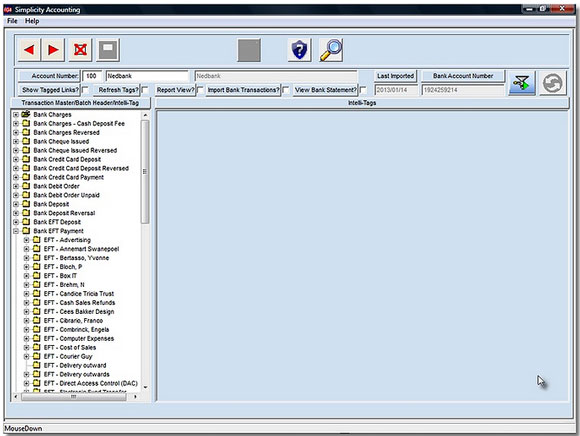
Follow a simple step-by-step workflow to clear tags, auto-generate captured batches, and train the embedded AI engine:
- 1 Download the CSV (Comma-Separated Values) file from your online bank.
- 2 Import the CSV file directly into simplicityERP from the Control Panel.
- 3 View the tags for all unrecognized or unparsed transactions.
- 4 Select a tag and add it to an existing batch, or create a new batch and complete all required details. Save the batch.
- 5 The tag is automatically removed from the list of active tags.
- 6 Continue until all remaining tags have been cleared.
- 7 Generate captured transactions.
- 8 If the autopost option is enabled, the generated transactions will automatically post directly to the ledger.
System Intelligence & Integrity Controls
Artificial Intelligence Rules
AI is utilized to assign transactions to desired batches. For example, similar transactions may have the date embedded within the reference string and can be correctly assigned while ignoring the date parameter. Wildcard matching is also supported.
Knowledge Base Growth
As this process is repeated, the knowledge base grows. In month 2, regular transactions are processed automatically. By the end of 12 months, up to 90% of all imported transactions are recognized, generated, and posted automatically.
Integrity Validation
System integrity is validated by calculating the internal balance and comparing it against the balance on the imported bank statement file to ensure complete reconciliation accuracy.
Exact-Replica Internal Ledger
An internal bank statement is created in simplicityERP as an exact replica of the bank statement. This mirror ledger can be easily viewed, audited, and searched at any time.
Real-World Performance Benchmark
Scenario: An enterprise required urgent reconciliation of bank accounts covering a 2-year period (Jan 2011 to Jan 2013).
Execution: The downloaded CSV statement containing 1,244 transactions was imported into simplicityERP. Utilizing AI pattern recognition, the entire file was auto-matched, captured, and posted in under 10 minutes.